Deprecated: strpos(): Passing null to parameter #1 ($haystack) of type string is deprecated in /www/wwwroot/phxin.top/usr/themes/Joe/public/config.php on line 19

Deprecated: strpos(): Passing null to parameter #1 ($haystack) of type string is deprecated in /www/wwwroot/phxin.top/usr/themes/Joe/public/config.php on line 20

Deprecated: strpos(): Passing null to parameter #1 ($haystack) of type string is deprecated in /www/wwwroot/phxin.top/usr/themes/Joe/public/config.php on line 21

Deprecated: strpos(): Passing null to parameter #1 ($haystack) of type string is deprecated in /www/wwwroot/phxin.top/usr/themes/Joe/public/config.php on line 22

Deprecated: strpos(): Passing null to parameter #1 ($haystack) of type string is deprecated in /www/wwwroot/phxin.top/usr/themes/Joe/public/config.php on line 23
SI常用操作 - Hello World

SI常用操作

清歌
2024-07-09 / 0 评论 / 0 阅读 / 正在检测是否收录...

[button color="light" icon="" url="https://xinin.top/index.php/archives/Source-Insight.html" type=""]SI中文乱码[/button]
[button color="light" icon="" url="https://xinin.top/index.php/archives/SI-new-project.html" type=""]SI新建工程[/button]

查找被调用函数原型

  1. 双击函数自动跳转到函数原型
  2. 鼠标右键菜单中选择jump to definition
  3. Ctrl键+鼠标左键

函数的跳转与返回

快捷键
Alt+逗号键   返回上一步
Alt+句号键   前进一步
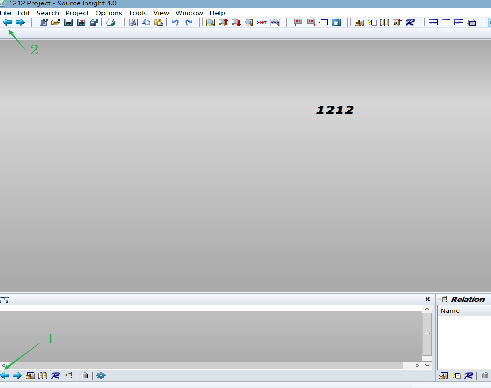
image-20240709131726456

除了快捷键之外还有菜单按钮,如箭头上1和2所示的位置。其中1主要控制主代码区域,2主要控制Local Variable窗口的函数跳转与返回

显示行号

View菜单下勾选Line Numbers
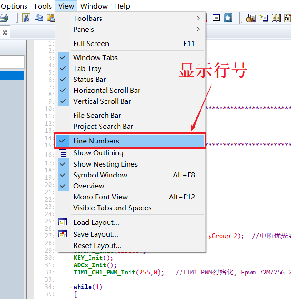
image-20240709132939106

字体自定义

菜单栏点击Options选择File type options
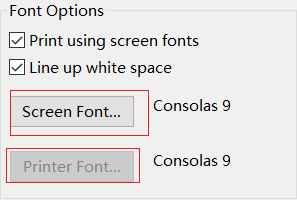
image-20240709133035931

快捷键添加

(Help -> Create Key List) 快捷键列表
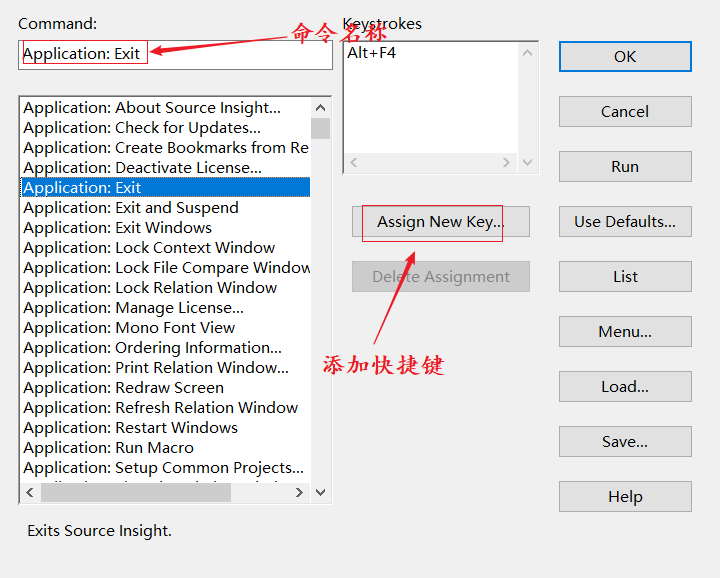
image-20240709133153703

当前文件搜索

快捷键
Ctrl+F

image-20240709133337419

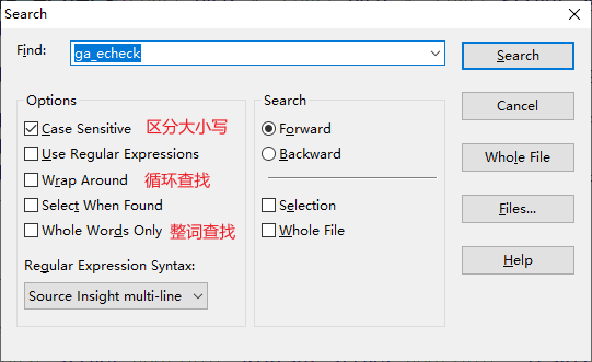
搜索选项:
Case Sensitive:勾选表示区分大小写。例如,搜 ga_echeck 时勾选的话,就不会搜到 Ga_echeck ,不勾选就会搜到。
Use Regular Expressions:使用正则表达式进行搜索,比较少用;
Wrap Around:循环搜索。勾选后,搜索到文件尾部后,会继续跳转到文件开头搜索;
Select When Found:查找到的时候,选中该符号,没太大用处;
Whole Words Only:勾选后会整词查找。例如,搜 ga_echeck 时勾选的话,就不会查找到 ga_echeck_new,不勾选会查找到

全局查找搜索

快捷键
Ctrl+/
菜单按键

image-20240709133602032

image-20240709133638692

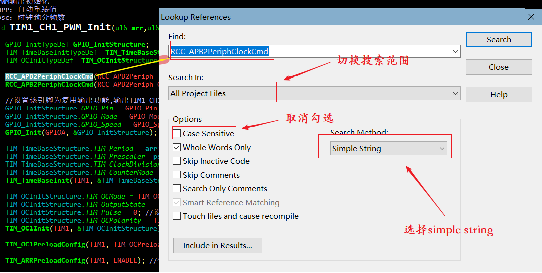
Search In:可以选择搜索范围,可以选择在 整个工程 或 当前文件 或 某个类型的文件。

Options:
Case Sensitive:勾选表示区分大小写。例如,搜 ga_echeck 时勾选的话,就不会搜到 Ga_echeck ,不勾选就会搜到。
Whole Words Only:勾选后会整词查找。例如,搜 ga_echeck 时勾选的话,就不会查找到 ga_echeck_new,不勾选会查找到。
Skip Inactive Code:勾选后会跳过无效的代码。例如,ga_echeck 用 #if 0 括起来,那么就不会被搜到;
Skip Comments:勾选后会跳过注释。例如,单行注释//ga_echeck不会被搜到;
Search Only Comments:只在注释中去搜索。

Search Method:
Simple String:按照字符串去搜索,选择这个,连printf("ga_echeck\n")中的字符串也会被搜到;
Look Up Reference:查找引用,查找变量、函数等调用的地方;
Regular Expression:按照正则表达式去搜索,没使用过;
Key Expression:没使用过。

快捷键汇总

所有快捷键可以在(Help -> Create Key List)查找

F3查找上一个
F4查找下一个
Ctrl+H :替换
Ctrl+G :在当前文件跳转到某一行(Go to line… )
Ctrl+= :跳到定义(Jump To Definition)
0

评论 (0)

取消