Deprecated: strpos(): Passing null to parameter #1 ($haystack) of type string is deprecated in /www/wwwroot/phxin.top/usr/themes/Joe/public/config.php on line 19

Deprecated: strpos(): Passing null to parameter #1 ($haystack) of type string is deprecated in /www/wwwroot/phxin.top/usr/themes/Joe/public/config.php on line 20

Deprecated: strpos(): Passing null to parameter #1 ($haystack) of type string is deprecated in /www/wwwroot/phxin.top/usr/themes/Joe/public/config.php on line 21

Deprecated: strpos(): Passing null to parameter #1 ($haystack) of type string is deprecated in /www/wwwroot/phxin.top/usr/themes/Joe/public/config.php on line 22

Deprecated: strpos(): Passing null to parameter #1 ($haystack) of type string is deprecated in /www/wwwroot/phxin.top/usr/themes/Joe/public/config.php on line 23
ubuntu安装cp210x驱动详细教程 - Hello World

ubuntu安装cp210x驱动详细教程

清歌
2022-10-09 / 0 评论 / 0 阅读 / 正在检测是否收录...

官方提供的教程

1. make ( your cp210x driver )
2. cp cp210x.ko to /lib/modules/<kernel-version>/kernel/drivers/usb/serial
3. insmod /lib/modules/<kernel-version/kernel/drivers/usb/serial/usbserial.ko
4. insmod cp210x.ko

ubuntu18.04等高版本安装

在高版本20.04和18.04等版本,不需要执行下面这条命令来编译makefile文件,因为系统自身存在串口驱动cp210x.o

cp210x.ko文件就在目录

/lib/modules/你的版本号/kernel/drivers/usb/serial

ubuntu低版本安装

1.首先确定ubuntu内核的版本,打开终端输入命令行:
sudo uname -a
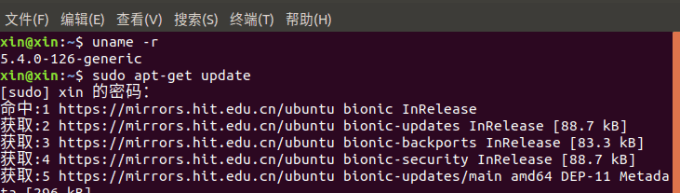
请输入图片描述

2.在官网找到和自己版本对应的cp210x版本,下载解压后文件内有.c和makefile文件,在终端执行命令行
sudo make  (文件里的makefile文件)
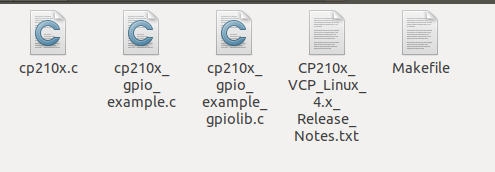
请输入图片描述

3、编译完成后文件夹内会出现.ko文件。然后执行
 sudo insmod cp210x.ko
4.将cp210x.ko复制到 /lib/modules/你的版本号/kernel/drivers/usb/serial文件夹内

运行cp210x驱动

1.加载USB转串口驱动
modprobe usbserial
2.加载cp210x
modprobe cp210x
3.将串口和电脑连接,用下面的代码检测驱动是否安装成功
ls -l /dev/ttyUSB* 

请输入图片描述
如果是连接后才有出现的ttyUSB0或者ttyUSB1之类的,说明驱动安装成功。

参考:
Ubuntu20.04等高版本 【linux 下的串口驱动安装】
Ubuntu14.04 Linux4.x.x 下安装USB转串口驱动---cp210x
ubuntu18.04 USB cp210x驱动安装教程
ubuntu加载cp210x驱动

0

评论 (0)

取消